
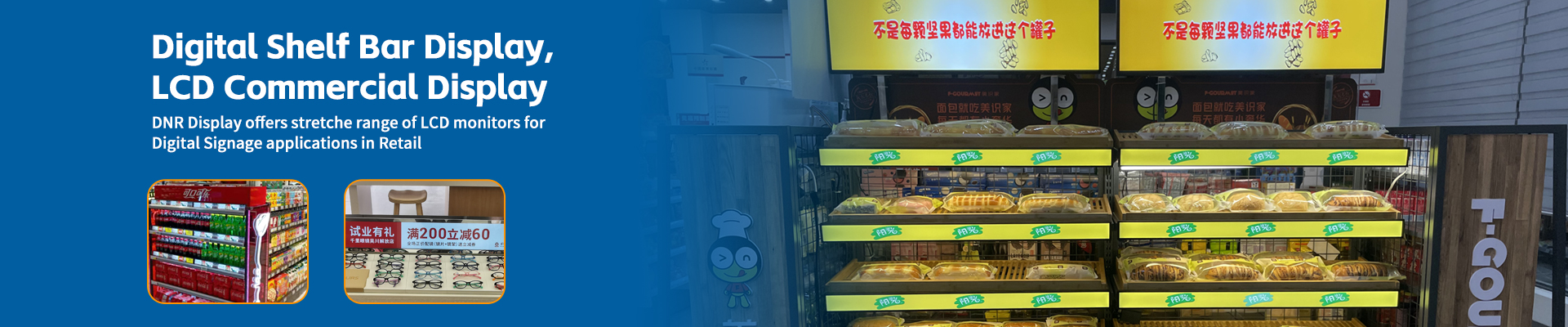
When exploring the world of digital signage, you’ll quickly discover that bar displays come in a wide variety of sizes, each designed for specific applications and environments. From compact 7-inch models perfect for tight spaces to expansive 32-inch displays that command attention, the sizing options can seem overwhelming. But understanding the relationship between size, aspect ratio, and application is crucial for selecting the right bar display that meets your specific needs.
In this comprehensive sizing guide, we’ll explore everything you need to know about bar display dimensions – from the smallest 7-inch models to the largest 32-inch options. We’ll examine common aspect ratios like 16:3, 8:1, and 6:1, and help you understand which size works best for different commercial applications. Whether you’re outfitting a retail store, restaurant, office, or transportation hub, this guide will help you make an informed decision about bar display sizing.
Understanding Bar LCD Display Size Measurements
Before diving into specific sizes, it’s important to understand how bar LCD display sizes are measured and what the numbers actually represent. Unlike traditional square displays, bar LCD displays have unique sizing characteristics that require special consideration.
Width vs. Height:
Bar LCD displays are typically measured by their width (the horizontal dimension) and height (the vertical dimension). When you see a “7-inch bar LCD display,” this usually refers to the width measurement, with the height being significantly smaller. For example, a 7-inch bar LCD display might be 7 inches wide and only 2 inches tall, creating the characteristic elongated form factor.
Aspect Ratios Explained:
The aspect ratio is one of the most important considerations when selecting a bar display size. This ratio represents the relationship between width and height, and it determines how content will appear on the screen. Common bar display aspect ratios include:
- 16:3 Aspect Ratio: This ratio creates a display that’s 16 units wide for every 3 units tall. It’s one of the most common bar display ratios, offering a wide but not extremely elongated format. A 32-inch 16:3 bar display would be approximately 32 inches wide and 6 inches tall.
- 8:1 Aspect Ratio: This extremely wide ratio creates a display that’s 8 units wide for every 1 unit tall. It’s perfect for applications where maximum width is needed in minimal vertical space. A 16-inch 8:1 bar display would be approximately 16 inches wide and only 2 inches tall.
- 6:1 Aspect Ratio: Similar to 8:1 but slightly less elongated, this ratio offers a balance between width and height. It’s often used in retail environments for shelf edge displays. A 12-inch 6:1 bar display would be approximately 12 inches wide and 2 inches tall.
- 4:1 Aspect Ratio: This ratio creates a display that’s 4 units wide for every 1 unit tall. It’s less common but useful for applications where a moderate aspect ratio is needed.
Viewing Distance Considerations:
The size of your bar display should be determined, in part, by the typical viewing distance. As a general rule:
- 7-12 inch displays: Best for close viewing distances (1-3 feet), such as countertop applications or shelf edge displays where customers are very close.
- 12-20 inch displays: Ideal for moderate viewing distances (3-8 feet), suitable for aisle signage, checkout counters, or wall-mounted displays in smaller spaces.
- 20-32 inch displays: Perfect for longer viewing distances (8-15 feet), suitable for large wall installations, transportation terminals, or retail environments where viewers are at a distance.
Physical Installation Space:
Before selecting a size, carefully measure the physical space where the display will be installed. Consider:
- Available width and height
- Mounting options (wall, ceiling, countertop)
- Obstructions like pipes, light fixtures, or architectural elements
- Required clearance around the display for ventilation and access
- Whether the display will be installed in portrait or landscape orientation

The 7-12 Inch Bar LCD Display Range: Compact Solutions
The smallest bar LCD displays, ranging from 7 to 12 inches in width, offer compact solutions for space-constrained environments. These displays excel in applications where a traditional screen would be too large or where viewers are in close proximity.
7-9 Inch Bar LCD Displays:
The smallest bar displays in this range are perfect for extremely tight spaces:
Common Aspect Ratios: 8:1, 6:1, and 4:1
Physical Dimensions: Typically 7-9 inches wide and 1.5-2.5 inches tall
Ideal Applications:
- Shelf edge displays in retail stores
- Small countertop displays in restaurants or cafes
- Narrow architectural spaces like handrails or columns
- Interactive kiosks with limited space
- Product displays in vending machines or automated retail systems
Content Considerations: These small displays work best with simple, high-contrast content. Text should be large and legible, and complex graphics may not render well at this size. Single-line scrolling text, simple icons, and basic information displays work particularly well.
Popular Models: Common 7-9 inch bar displays include models with 1920×240 (8:1) or 1920×360 (16:3) resolutions, providing good detail for their size.
Mounting Options: These compact displays often come with versatile mounting options including adhesive backing, magnetic mounts, or small brackets for countertop or shelf mounting.
10-12 Inch Bar Displays:
Slightly larger than the 7-9 inch range, these displays offer more screen real estate while still maintaining a compact profile:
Common Aspect Ratios: 16:3, 8:1, 6:1
Physical Dimensions: Typically 10-12 inches wide and 2-3 inches tall
Ideal Applications:
- Medium-sized shelf edge displays
- Checkout counter advertising and promotions
- Small digital menu boards in quick-service restaurants
- Information displays in elevators or narrow corridors
- Wayfinding signs in office buildings or healthcare facilities
Content Considerations: The increased size allows for more complex content while maintaining readability. You can display multiple lines of text, simple graphics, and even basic video content effectively. However, detailed images or small text may still be challenging.
Popular Models: Common 10-12 inch bar displays often feature 1920×360 (16:3) or 2560×480 (16:3) resolutions, providing good image quality for their size.
Mounting Options: These displays typically offer more robust mounting options including wall brackets, countertop stands, and even ceiling mounts for certain models.
Advantages of Small Bar Displays:
- Space Efficiency: Perfect for tight spaces where traditional displays won’t fit
- Cost-Effective: Generally less expensive than larger displays
- Energy Efficient: Smaller size typically means lower power consumption
- Easy Installation: Lightweight and compact, making installation quick and simple
- Discreet Appearance: Can blend into architectural elements without being obtrusive
Limitations of Small Bar Displays:
- Limited Content Complexity: Not suitable for detailed graphics or large amounts of text
- Close Viewing Only: Content may be difficult to read from a distance
- Smaller Impact: Less visually impactful than larger displays
- Limited Connectivity Options: May have fewer input/output ports than larger models
The 13-20 Inch Bar LCD Display Range: Versatile Solutions
The mid-range bar displays, from 13 to 20 inches wide, offer a versatile balance between size and functionality. These displays can be used in a wider variety of applications and can accommodate more complex content than their smaller counterparts.
13-16 Inch Bar Displays:
This sweet spot in bar display sizing offers excellent versatility:
Common Aspect Ratios: 16:3, 8:1, 6:1
Physical Dimensions: Typically 13-16 inches wide and 3-4 inches tall
Ideal Applications:
- Retail shelf edge displays for medium-sized products
- Checkout counter digital signage
- Restaurant table-top displays for menu or ordering
- Information displays in lobbies or waiting areas
- Small digital menu boards in cafes or bistros
- Wayfinding signs in retail stores or office buildings
Content Considerations: The increased size allows for much more flexible content options. You can display multiple lines of text, simple graphics, product images, and even basic video content. Text remains readable from a moderate distance, and the screen can accommodate more information without feeling cluttered.
Popular Models: Common 13-16 inch bar displays often feature 1920×360 (16:3) or 2560×480 (16:3) resolutions, providing good detail and clarity for their size.
Mounting Options: These displays typically offer robust mounting solutions including wall brackets, countertop stands, and even ceiling mounts. Some models also come with adjustable viewing angles for optimal visibility.
17-20 Inch Bar Displays:
At the larger end of the mid-range, these displays offer even more screen real estate:
Common Aspect Ratios: 16:3, 8:1
Physical Dimensions: Typically 17-20 inches wide and 4-5 inches tall
Ideal Applications:
- Large retail shelf edge displays
- Promotional displays at checkout counters
- Digital menu boards in full-service restaurants
- Information displays in transportation hubs
- Corporate communications in office common areas
- Interactive displays in retail or hospitality settings
Content Considerations: These displays can handle quite complex content, including product images, promotional videos, and detailed information. Text is easily readable from a distance, and the screen can accommodate multiple content zones or layouts effectively.
Popular Models: Common 17-20 inch bar displays often feature 1920×360 (16:3) or 2560×480 (16:3) resolutions, with some higher-end models offering 3840×720 (16:3) for exceptional image quality.
Mounting Options: These displays typically offer professional mounting solutions including articulating arms, fixed wall mounts, and ceiling mounts. Some models also come with built-in brightness adjustment for different lighting conditions.
Advantages of Mid-Range Bar Displays:
- Versatile Applications: Can be used in a wide variety of environments and applications
- Better Content Flexibility: Can accommodate more complex content than smaller displays
- Good Readability: Content remains readable from moderate distances
- Professional Appearance: Have a more substantial, professional look than smaller displays
- Feature-Rich: Often include more connectivity options and features than smaller models
Limitations of Mid-Range Bar Displays:
- Larger Footprint: Require more installation space than smaller displays
- Higher Cost: More expensive than smaller bar displays
- Increased Power Consumption: Larger size typically means higher power usage
- More Complex Installation: Heavier and may require more robust mounting solutions
The 21-32 Inch Bar LCD Display Range: Impactful Solutions
The largest bar displays, ranging from 21 to 32 inches wide, offer maximum impact and visibility. These displays are designed for applications where content needs to be seen from a distance or where a more substantial presence is desired.
21-24 Inch Bar Displays:
These large displays command attention while maintaining the elongated bar form factor:
Common Aspect Ratios: 16:3, 8:1
Physical Dimensions: Typically 21-24 inches wide and 5-6 inches tall
Ideal Applications:
- Promotional displays in large retail environments
- Information displays in transportation terminals
- Digital menu boards in large restaurants or food courts
- Corporate communications in lobbies or atriums
- Wayfinding signs in large buildings or campuses
- Entertainment information in hotels or resorts
Content Considerations: These displays can handle virtually any type of content, including high-resolution images, full video content, and complex information layouts. Text is easily readable from a distance, and the screen can accommodate multiple content zones or sophisticated layouts.
Popular Models: Common 21-24 inch bar displays often feature 1920×360 (16:3) or 3840×720 (16:3) resolutions, providing excellent image quality and detail.
Mounting Options: These displays typically require professional mounting solutions including heavy-duty wall brackets, ceiling mounts, or even floor stands for certain applications. Some models also come with built-in environmental protection for demanding installations.
25-32 Inch Bar Displays:
At the top end of the size range, these displays offer maximum impact and visibility:
Common Aspect Ratios: 16:3
Physical Dimensions: Typically 25-32 inches wide and 6-8 inches tall
Ideal Applications:
- Major promotional displays in flagship retail stores
- Information displays in large transportation hubs like airports
- Digital menu boards in large restaurant chains or food courts
- Corporate communications in executive areas or boardrooms
- Wayfinding in large facilities like hospitals or universities
- Entertainment and advertising in high-traffic areas
Content Considerations: These displays can handle the most demanding content requirements, including 4K video, high-resolution product images, and complex information layouts. They’re perfect for creating immersive visual experiences and making a strong impression on viewers.
Popular Models: Common 25-32 inch bar displays often feature 3840×720 (16:3) or even higher resolutions, providing exceptional image quality and clarity.
Mounting Options: These displays require professional installation and robust mounting solutions. They often come with specialized mounting hardware and may require professional installation services.
Advantages of Large Bar LCD Displays:
- Maximum Impact: Create a strong visual impression and command attention
- Long-Range Visibility: Content remains readable from significant distances
- Content Flexibility: Can handle the most complex content requirements
- Professional Appearance: Have a substantial, high-end appearance
- Future-Proofing: Larger size accommodates future content requirements
Limitations of Large Bar Displays:
- Significant Space Requirements: Require substantial installation space
- Highest Cost: Most expensive bar display option
- Increased Power Consumption: Larger size means significantly higher power usage
- Professional Installation Required: Often require professional installation services
- Heavier Weight: More difficult to handle and mount than smaller displays
Aspect Ratio Considerations by Size
The aspect ratio you choose should be closely tied to both the display size and your specific application requirements. Let’s explore how different aspect ratios work across various size ranges.
16:3 Aspect Ratio Across Sizes:
The 16:3 aspect ratio offers a good balance between width and height, making it versatile across different size ranges:
- 7-12 inch range: Provides a compact but usable display for close viewing applications like shelf edge displays or countertop signage.
- 13-20 inch range: Offers excellent versatility for retail, hospitality, and corporate applications. The additional screen real estate allows for more complex content while maintaining the elongated form factor.
- 21-32 inch range: Creates a substantial display that can be seen from a distance while still maintaining the distinctive bar shape. Ideal for promotional content and information displays in high-traffic areas.
8:1 Aspect Ratio Across Sizes:
The extremely wide 8:1 aspect ratio creates a very narrow display that’s perfect for space-constrained applications:
- 7-12 inch range: Creates very compact displays ideal for extremely tight spaces like narrow shelves, handrails, or architectural features.
- 13-20 inch range: Offers a good balance between width and usability, suitable for applications like checkout counter advertising or narrow wall installations.
- 21-32 inch range: Creates an extremely wide display that’s perfect for large-scale installations where maximum width is needed in minimal vertical space, such as large retail environments or transportation terminals.
6:1 Aspect Ratio Across Sizes:
The 6:1 aspect ratio offers a slightly less elongated form than 8:1, providing better content usability:
- 7-12 inch range: Creates compact but more usable displays than 8:1 models, suitable for applications like small digital menus or product information displays.
- 13-20 inch range: Offers excellent content flexibility while maintaining a narrow profile, ideal for retail shelf edge displays or countertop applications.
- 21-32 inch range: Provides a substantial display with good content usability, suitable for applications like large digital menu boards or promotional displays.
Application-Based Size Selection Guide
To help you choose the right bar display size for your specific application, here’s a practical guide based on common commercial environments:
Retail Applications:
- Shelf Edge Displays: 7-16 inch range with 8:1 or 6:1 aspect ratio. Choose smaller sizes (7-12 inch) for standard shelves and larger sizes (13-16 inch) for end caps or promotional displays.
- Checkout Counter Advertising: 10-20 inch range with 16:3 aspect ratio. Choose based on counter space and desired visibility distance.
- Aisle Signage: 13-24 inch range with 16:3 aspect ratio. Choose larger sizes for wider aisles or longer viewing distances.
- Window Displays: 20-32 inch range with 16:3 aspect ratio. Choose larger sizes for maximum impact from outside the store.
Hospitality Applications:
- Digital Menus: 10-24 inch range with 16:3 aspect ratio. Choose based on table size and menu complexity.
- Order Status Displays: 7-16 inch range with 16:3 aspect ratio. Choose based on counter space and viewing distance.
- Reservation Information: 10-20 inch range with 16:3 aspect ratio. Choose based on lobby size and typical viewing distance.
- Wayfinding: 13-32 inch range with 16:3 aspect ratio. Choose based on facility size and required visibility distance.
Transportation Applications:
- Flight/Train Information: 20-32 inch range with 16:3 aspect ratio. Choose larger sizes for maximum visibility in busy terminals.
- Wayfinding and Navigation: 16-32 inch range with 16:3 aspect ratio. Choose based on facility size and required visibility distance.
- Security and Safety Information: 13-24 inch range with 16:3 aspect ratio. Choose based on installation location and required visibility.
- Advertising and Promotions: 20-32 inch range with 16:3 aspect ratio. Choose larger sizes for maximum impact.
Corporate and Office Applications:
- Digital Signage: 13-24 inch range with 16:3 aspect ratio. Choose based on common area size and typical viewing distance.
- Meeting Room Information: 7-16 inch range with 16:3 aspect ratio. Choose based on hallway space and viewing distance.
- Wayfinding and Navigation: 13-24 inch range with 16:3 aspect ratio. Choose based on building size and required visibility distance.
- Reception Area Information: 16-32 inch range with 16:3 aspect ratio. Choose based on reception area size and desired impact.
Education Applications:
- Campus Navigation: 16-32 inch range with 16:3 aspect ratio. Choose based on campus size and required visibility distance.
- Event Information: 13-24 inch range with 16:3 aspect ratio. Choose based on installation location and typical viewing distance.
- Emergency Information: 16-24 inch range with 16:3 aspect ratio. Choose based on facility size and required visibility.
- Digital Wayfinding: 20-32 inch range with 16:3 aspect ratio. Choose larger sizes for maximum visibility in large campuses.
Practical Considerations for Size Selection
Beyond the technical specifications, several practical considerations should influence your size selection:
Budget Considerations:
Bar LCD display prices generally increase with size, but the relationship isn’t always linear. Consider:
- Entry-Level Options: Smaller displays (7-12 inch) typically start at $200-500, making them accessible for budget-conscious projects.
- Mid-Range Options: Medium displays (13-20 inch) typically range from $400-1,000, offering a good balance of features and price.
- Premium Options: Larger displays (21-32 inch) typically range from $800-2,000+, with high-end models costing significantly more.
- Total Cost of Ownership: Consider not just the initial purchase price but also installation costs, power consumption, and maintenance requirements.
Installation Requirements:
Larger displays require more robust installation solutions:
- Wall Mounting: All sizes can be wall-mounted, but larger displays require more substantial mounting hardware and professional installation.
- Ceiling Mounting: Larger displays (20+ inch) typically require professional ceiling mounting services.
- Counter/Table Mounting: Smaller displays (7-16 inch) are often designed for countertop or table mounting, while larger displays typically require more substantial bases or brackets.
- Power Requirements: Larger displays typically require more power and may need dedicated electrical circuits or professional wiring.
Content Creation Considerations:
The size you choose will impact your content creation requirements:
- Small Displays (7-12 inch): Require simple, high-contrast content with large text and minimal graphics.
- Medium Displays (13-20 inch): Can accommodate more complex content but still require careful attention to text size and layout.
- Large Displays (21-32 inch): Can handle virtually any content type but require higher resolution assets and more sophisticated design.
Future-Proofing Considerations:
Consider how your needs might evolve:
- Scalability: Choose a size that allows for future expansion or reconfiguration of your digital signage network.
- Technology Advancement: Consider how display technology might evolve and whether your chosen size will remain suitable.
- Changing Requirements: Anticipate how your content and messaging needs might change over time.
Conclusion: Choosing the Right Bar LCD Display Size
Selecting the right bar LCD display size is a critical decision that impacts both the effectiveness of your digital signage and your overall investment. By carefully considering the factors outlined in this guide – from aspect ratios and viewing distances to application requirements and practical considerations – you can choose a size that perfectly matches your needs.
Remember that the “best” size isn’t necessarily the largest or most expensive – it’s the size that delivers your content effectively in your specific environment. A properly sized bar LCD display will enhance your communication, engage your audience, and provide maximum return on your investment.
Whether you’re outfitting a small retail shop with 7-inch shelf edge displays or installing a large transportation terminal with 32-inch information screens, understanding the relationship between size, aspect ratio, and application will ensure you make the right choice for your unique requirements.


