
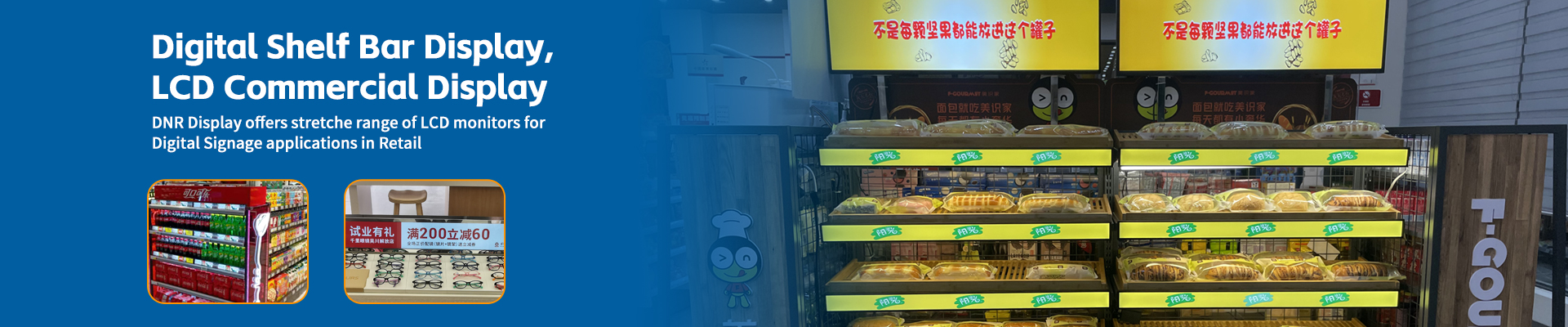
Let’s be honest. You’re not looking for those tiny 2-inch price tag screens. You want something that actually looks cool. A sleek, ultra-narrow screen that runs along your shelf edge—grabbing attention, showing promotions, playing short product videos.
The kind of screen that makes customers stop and look.
But when you search for “shelf edge LCD display price” or “digital shelf LCD screen cost”, all you find are those little e-ink tags. That’s not what you need.
You need a “narrow stretched bar LCD display”—sometimes called a shelf-edge LCD screen or ultra-slim digital poster. And yes, they cost more than those tiny tags. But here’s the good news: prices have dropped significantly in 2026.
Let me give you a transparent, realistic price guide so you can plan your budget—without getting ripped off.
# First, What Exactly Are We Talking About?
Just to make sure we’re on the same page:
A shelf edge LCD screen is typically:
– 7 to 15 inches tall? No. Much shorter. Usually 2 to 4 inches in height.
– Very wide: 15 to 35 inches (or even longer, custom-made).
– Aspect ratio: Extremely stretched, like 8:1, 12:1, or even 20:1.
– Mounted directly on the front edge of retail shelving (grocery, electronics, cosmetics, liquor stores).
Think of it as a digital strip—like a dynamic, colorful, video-capable replacement for those old plastic label holders.
These are not e-paper price tags. They are full LCD screens, often with touch optional, designed for branding and promotions.
# 2026 Price Range: What You’ll Actually Pay
Let me cut to the chase. In 2026, a decent shelf-edge LCD display costs:
| Screen Size (Width) | Height | Typical Price (per unit) |
| 15–19 inches | 2–3 inches | $180 – $280 |
| 20–25 inches | 3–4 inches | $280 – $420 |
| 26–32 inches | 3–5 inches | $420 – $650 |
| 35–43 inches (custom) | 4–6 inches | $650 – $1,200+ |
**Entry-level** (smaller, lower brightness, basic software): starting around **$180**
**Mid-range** (good brightness, remote content management): **$300 – $500**
**High-end** (ultra-narrow bezel, high brightness for well-lit stores, cloud platform): **$550 – $1,000+**
Yes, that’s more expensive than a tiny e-ink tag. But you’re not buying a price tag. You’re buying a digital billboard on your shelf.
—
# Why Such a Wide Price Range?
Good question. Here’s what makes one narrow shelf screen cheaper or more expensive.
## 1. Height (Thinness)
The thinner the screen (e.g., 2 inches tall vs 4 inches tall), the harder it is to manufacture. Ultra-narrow (under 2.5 inches) costs significantly more. If your shelf has limited vertical space, you pay a premium.
## 2. Brightness (Nits)
Standard indoor brightness: 250–350 nits → cheaper.
High brightness (for stores with skylights or bright LED ceilings): 500–700 nits → +20–30% cost.
Direct sunlight? You need 1,000+ nits. That’s rare for shelf screens but possible. Add 50–100% to price.
## 3. Length & Customization
Standard lengths (19″, 24″, 28″, 32″) are cheaper.
Custom length to fit your exact shelf? You’ll pay a one-time engineering fee ($200–$500) plus higher per-unit cost.
## 4. Touch vs Non-Touch
Most shelf screens are non-touch (just display). Touch adds $50–$150 per screen. Do you need it? Probably not for shelf edges—customers rarely touch that high. But for interactive recipe displays in grocery? Maybe.
## 5. Software & Content Management
Here’s the sneaky part. The hardware is one cost. But to update 20 screens in your store without running around with a USB stick, you need **remote management software**.
Some vendors bundle basic cloud software for free (limited to 10 screens). Others charge $10–$30/month per store. A few charge per screen ($2–$5/screen/month). Always ask.
—
# The Hidden Costs (Budget for These)
When a vendor quotes you a price, they often leave out a few things. Let me save you from surprises.
## Mounting Brackets
Standard VESA mounts don’t work well on shelf rails. Most narrow shelf screens use custom clips or magnetic mounts.
Cost: $15–$40 per screen. Some vendors include them. Most don’t.
## Power Supplies
Each screen needs a small 12V or 24V power adapter.
Cost: $10–$25 each. If you have 20 screens, that’s $200–$500 extra.
## Cabling & Cable Management
Running power and data cables along a shelf looks messy. You’ll need cable covers or in-rail wiring.
Budget $5–$10 per screen for tidy installation.
## Installation Labor
Installing one screen? Easy. Installing 15 screens across multiple aisles? That’s half a day for one person.
DIY: free (but your time counts). Hire a freelancer: $30–$60/hour. For 20 screens, maybe 6–8 hours → $180–$480.
## Content Creation
The screen is useless without good content. Static “Sale!” text is fine. But video loops or animated price changes? You might need a simple tool or hire a designer.
DIY with Canva or similar: free. Professional templates: $50–$200 one-time.
—
# LCD vs Other Technologies (Why Not Just Use a Tablet?)
You might think: Why not just mount cheap tablets on the shelf?
You could. But here’s why narrow stretched bar LCD displays are better for this specific job:
| Feature | Regular Tablet | Shelf Edge LCD Display |
| Shape | Square/rectangle | Ultra-wide strip |
| Fits shelf edge | No (sticks out) | Yes (flush) |
| Professional look | Meh | Excellent |
| Brightness | 300–400 nits | 350–700 nits |
| Remote management | Possible but clunky | Built-in |
| Durability (dust, cleaning) | Low | Medium (some have protective coating) |
| Cost per inch of display | Higher | Lower for wide format |
Tablets work for a prototype. For a real store with 10+ shelves? Get proper narrow screens.
—
# Real-World Budget Examples (2026)
Let me give you three realistic scenarios based on store size. Prices are for **mid-range narrow stretched bar LCD displays** ($350 average per screen, 24-inch length, non-touch, standard brightness).
## Small Boutique (6 screens)
– Hardware: 6 × $350 = $2,100
– Mounts: 6 × $25 = $150
– Power adapters: 6 × $15 = $90
– Software (free tier for under 10 screens): $0
– Installation (DIY, 3 hours): $0
– **Total: $2,340**
## Medium Grocery Store (25 screens)
– Hardware: 25 × $320 (volume discount) = $8,000
– Mounts: 25 × $20 = $500
– Power adapters: 25 × $12 = $300
– Software (cloud, $20/month): $240/year
– Installation (hired, 8 hours @ $40/hr): $320
– **Total year 1: $9,360**
– **Annual recurring: $240 (software)**
## Large Electronics Retailer (60 screens)
– Hardware: 60 × $290 (bulk discount) = $17,400
– Mounts (magnetic, premium): 60 × $30 = $1,800
– Power adapters (slim profile): 60 × $18 = $1,080
– Software (advanced, $50/month): $600/year
– Installation (professional team): $800
– **Total year 1: $21,680**
– **Annual recurring: $600**
—
# How to Save Money (Without Buying Junk)
You’re a budget-limited retailer. I get it. Here are five ways to keep costs down without regretting it later.
## 1. Buy Standard Sizes
Custom lengths kill your budget. Stick to 19″, 24″, 28″, or 32″. Those are mass-produced and 30–50% cheaper than custom.
## 2. Choose Non-Touch
You probably don’t need touch on a shelf screen. Skip it. Save $50–$100 per screen.
## 3. Use Free Software Tier First
Many vendors offer free cloud management for up to 10–20 screens. Start there. Upgrade only when you grow.
## 4. DIY Installation
Mounting narrow screens is not hard. Watch a YouTube video. Use a level. Take your time. Save hundreds in labor.
## 5. Buy Power Supplies in Bulk
Don’t buy individual $20 adapters from the screen vendor. Get 20-packs on Amazon or Alibaba for $8–$10 each. Same quality.
—
# Final Answer: How Much Should You Budget?
Here’s my honest, no-nonsense answer for 2026:
For a typical retail store with 10–30 shelves, budget $300–$450 per narrow stretched bar LCD display fully installed (hardware + mount + power + first-year software).
If you’re buying 50+ units, negotiate down to $250–$350 per screen.
If you’re buying fewer than 5 screens for a trial, expect to pay $400–$600 each because you lose volume discounts and may pay shipping.
And remember: These screens are not price tags. They are advertising space on your shelf. Every time a customer stops to watch a product video or notice a “Limited time offer” animation, that screen is paying for itself.
So don’t compare them to $30 e-ink tags. Compare them to the cost of a small in-store TV ad—except these sit right where the buying decision happens.
Now you know the real prices. Go plan that budget.


